
Allama Iqbal Open University is one of Pakistan’s most prominent institutions, offering education from matriculation to Ph.D. programs.
AIOU stands out for its flexible distance learning system, making it easier for students nationwide to pursue their studies.
The University holds exams twice a year, once in the Spring and once in the Autumn semester. After completing their assignments and exams, students eagerly await their results, which are crucial for their academic progress.
AIOU Result Dates
AIOU typically announces results 2 to 3 months after the final exams. Results are generally released in August or September for the Spring semester, while the Autumn semester results are usually announced in February or March.
Allama Iqbal Open University (AIOU) follows a semester-based system for conducting exams. Typically, there are two semesters in a year: Spring and Autumn. Exams are held after the semester ends, and the University usually takes 2 to 3 months to prepare and announce the results.
Different Exam Types Conducted by AIOU
AIOU offers exams for various programs, including:
- Matric (SSC)
- Intermediate (FA/FSc)
- Bachelor’s Programs (BA, BSc, Associate Degree)
- Master’s Programs (MA, MSc)
- Other certifications and professional diplomas
Details on the AIOU Result Sheet
When you check your result, it will include the following details:
- Student Name and Roll Number
- Semester and Program Information
- Course Codes and Titles
- Marks Obtained in Each Subject
- Assignment and Test Marks
- GPA/CGPA (for degree programs)
- Overall Status (Pass/Fail/Incomplete)
Result Timelines for Different Programs
Here is a general timeline for when AIOU announces results:
- Matric and FA Results: Usually declared within 2 months after exams.
- BA/BSc/Associate Degree Programs: Results are announced within 2–3 months post-exams.
- MA/MSc Programs: These results might take longer because assignments and exams are evaluated in detail.
AIOU Assignment Marks and Their Role in Results
Assignments are a critical part of AIOU’s grading system and usually account for 30–40% of the total marks for each course.
- Submission Deadline: Students must submit assignments on time to ensure they are marked and included in the final result.
- Compilation of Marks: The University combines assignment marks with exam scores to compile the final result.
| Criteria | Details |
| Weightage of Assignments | 30% of total marks |
| Weightage of Final Exams | 70% of total marks |
| Passing Marks (Aggregate) | 50% (combination of assignments and final exams) |
| Mandatory Passing Marks (Final Exam) | 40% (minimum marks required in the final exam) |
Note: Students who do not submit their assignments may be marked as Fail in that subject. It is essential to submit assignments on time to avoid such issues.
How to Check AIOU Results Online
Checking AIOU results online is simple, but many students need help with the system. Here’s a step-by-step guide:
- Visit the AIOU official website: www.aiou.edu.pk
- Click on the “Results” section.
- Select your relevant program and semester.
- Enter your Roll Number or Student ID.
- Click on the “Submit” button to view your result.
How To Download AIOU Result Card
To download your result as a PDF, just follow these steps.
- First, go to the official website of AIOU.
- Next, navigate to the Downloads section.
- In the Downloads section, click on the Latest Results tab.
- Select the result you want to download and click on the Download button.
- After clicking, the PDF file will be downloaded to your device.
- Open the PDF file, search for your name or roll number, and view your result.
Grading System and Passing Criteria
To pass, a student must achieve at least 40% in assignments and 40% in final exams. The overall passing percentage is 50% when both components are combined.
AIOU GPA/CGPA Scheme
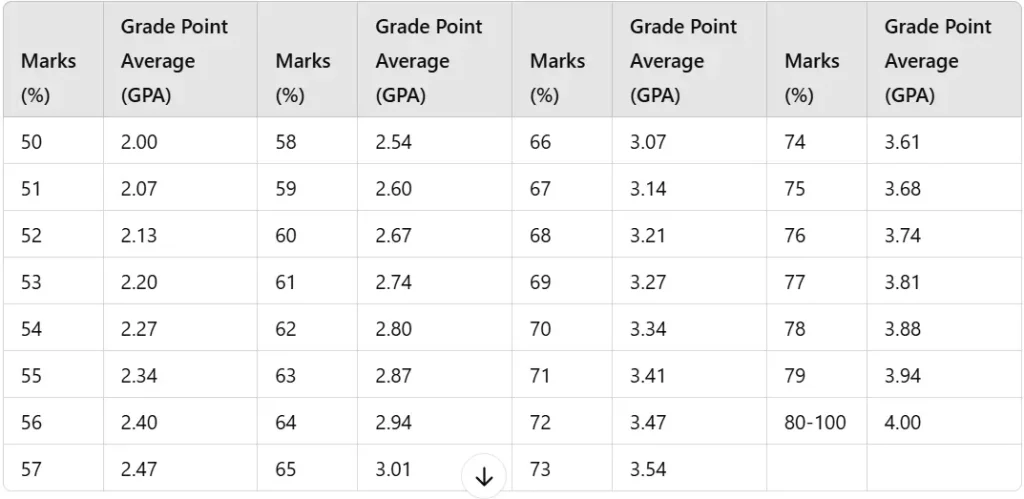
Grade Distribution Table
| Marks Obtained (%) | Grade | Grade Point Average (GPA) |
|---|---|---|
| 80-100% | A | 4.0 |
| 65-79% | B | 3.0 |
| 50-64% | C | 2.0 |
| Below 50% | F | 0 |
Minimum and Maximum Duration/Semesters: Programs On ODL Mode
| Program | Minimum Duration | Maximum Duration | Semesters (Minimum) | Semesters (Maximum) |
| Bachelor’s (BA/BSc/Associate Degree) | 2 years | 5 years | 4 semesters | 10 semesters |
| Master’s (MA/MSc) | 2 years | 5 years | 4 semesters | 10 semesters |
| B.Ed (1.5 Years) | 1.5 years | 4 years | 3 semesters | 8 semesters |
| B.Ed (4 Years) | 4 years | 6 years | 8 semesters | 12 semesters |
| M.Ed | 1 year | 3 years | 2 semesters | 6 semesters |
| Postgraduate Diplomas | 1 year | 3 years | 2 semesters | 6 semesters |
| Ph.D. Programs | 3 years | 8 years | 6 semesters | 16 semesters |
| Certificate Courses | 6 months | 1 year | 1 semester | 2 semesters |
Rechecking and Re-evaluation Process
If you believe your result needs to be corrected, AIOU offers a rechecking process. Follow these simple steps to request a recheck.
Download the Rechecking Application Form from the AIOU website.
Fill in your details and the subjects for which you want to recheck.
Pay the rechecking fee at the designated bank branches.
Submit the application and bank receipt to the University by the deadline.
Frequently Asked Questions (FAQs)
When will AIOU announce the 2025 result?
AIOU usually announces the results within 2 to 3 months after completing the exams. The exact date depends on the program and semester.
How can I check my AIOU result?
You can check your AIOU result by visiting the official AIOU website. Click on the Results section, enter your roll number, and view your result.
What is the passing percentage for AIOU exams?
You need a minimum of 50% overall (including assignments and final exams) to pass. You will only succeed if you score below 40% on the final exam.
Can I get a physical copy of my result card?
Yes, once you download your result card in PDF format, you can view it and print it for your records.
How to Contact AIOU for Result Queries
If you face any issues with your result, you can reach out to AIOU through the following channels:
- Helpline: 051-111-112-468
- Email: [email protected]
- Regional Offices: Visit the nearest regional office for help and support.