The wait for results after your 1st-year exams can feel long. If you have taken the exams under the Faisalabad Board, the results for the 11th class will be released on October 1, 2025. While the board prepares the results, many students wondering how to check their marks quickly and easily.
In this post, we’ll explain how to check your results online and through SMS. We’ll also cover how to request a paper recheck, apply for supplementary exams, and cancel your result if you want to retake 11th grade.
Bise Faisalabad 11th Class Result Date
Results date changes every year and usually announced in advance by board. This time all punjab educational boards decided to announce there result in same day.
bise Faisalabad 1st year result 2025 date
Bise Faisalabad will announce the results for 11th class on October 1, 2025, at 09:00 PM.
Key Points on Faisalabad Board 11th Class Result 2025
Here are the key details regarding the 11th class examination and results:
- The Faisalabad Board will announce the results for F.A. Part 1, FSc Part 1, ICS Part 1, and I.Com Part 1 on the same date.
- The names of the toppers will be declared one day before the regular result announcement.
- Students who score the highest marks in the annual exams will be awarded medals.
- The total marks for the HSSC Part 1 result will be 550.
- Morning session exams will start at 8:30 a.m.; each paper will last three hours.
- The timing of the Islamiat paper will be different from that of other subjects.
- The 11th class roll number slip will be issued one week before the exams.
- The minimum passing mark is 33%.
How to Check the BISE Faisalabad Board 11th Class Result
If you’re looking to check your BISE Faisalabad Board 11th class result, there are four easy methods. Here’s a simple guide for each option:
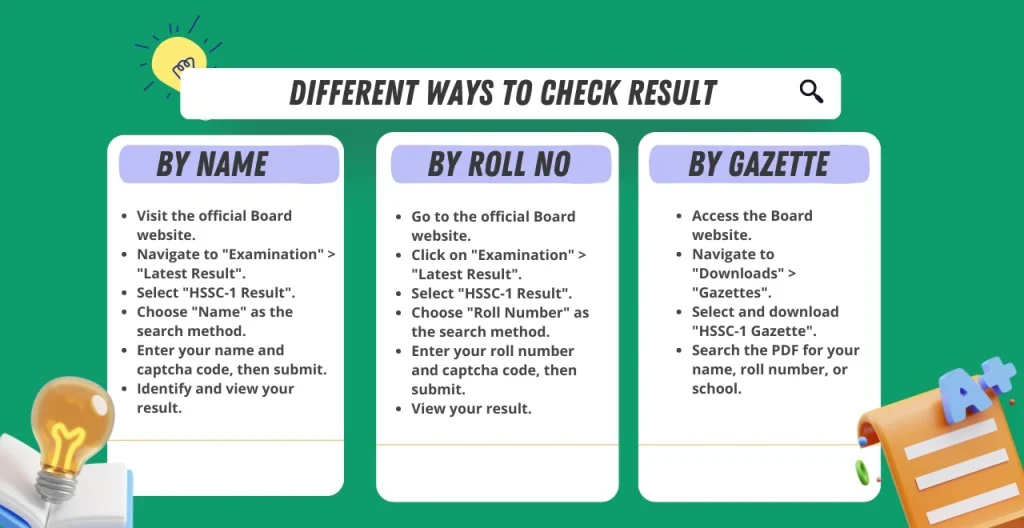
Method 1: Check Bise Faisalabad Result By Roll Number
- Open the Faisalabad Board website in Google Chrome.
- Find and click the “Result of Intermediate First Annual” option on the homepage.
- A new tab with a search bar will open. Select “By Roll Number.”
- Enter your roll number and click on “View Result.”
- After a few seconds, your result will appear on your screen.
Note: You have the option to download the result from your device.
Method 2: Check Bise Faisalabad Result By SMS
- Write your roll number in a text message.
- Send the message to 800240.
- You will receive an SMS with your result shortly.
Method 3: Check Bise Faisalabad Result By Name
- Open the Faisalabad Board website using Google Chrome or any browser.
- Click on the Result section and Select the latest result.
- Click on “Result of Intermediate First Annual” on the homepage.
- In the new tab, select “By Name.”
- Enter your name and your father’s name.
- Click “View Result” and find your result based on your school’s name.
Method 4: Check Bise Faisalabad Result By Gazette
- Visit the Official website of the Faisalabad board.
- Find the “Download” section in the main menu on the homepage and open it.
- In the download section, find the gazette and save it on your device.
- Open your Gazette Pdf format.
- Use the search bar and CLTR + F Option to check your result.
These methods make it easy to access your 11th-class result, no matter your situation.
Gazette of BISE Faisalabad 11th class 2025
Bise Faisalabad Board has posted the results gazette on their official website. It takes 1 hour to upload the gazette. Once it’s available, you’ll be notified on our website. Here are the new and Old gazettes you can download at any time.
| Year | Title | Download |
| 2025 | 11th Class | Download/View |
How to Request a Recounting After Receiving a Poor Result
If you’re unsatisfied with your 11th class result and think there might have been a mistake, you can request a recounting of your answer sheets. This process will review your marks to ensure that everything was calculated correctly. Follow these steps to start the recounting process:
- Visit the Faisalabad Board Website:
- Open the board’s website on your browser.
- Access Online Services:
- Click the “Online” tab on the homepage and select “Online Services.”
- From the available options, choose “Rechecking.”
- Fill Out the Application Form:
- Select “HSSC Part 1” as your exam type.
- Please provide details such as your name, roll number, exam session, and date of birth (as per your matric result card).
- Choose the subjects you want to have recounted and enter your contact details (phone number and address).
- Submit the Form:
- After filling in all the required information, click “Apply” to submit your request.
- Pay the Recounting Fee:
- Go back to the website and click on “Online Challan.”
- Enter “2025” and select “Annual” as the exam type.
- Choose the fee category as “Rechecking” and download the challan form.
- Pay the fee at the designated bank mentioned on the challan form.
- Verification and Office Visit:
- Once your application is verified, the board will notify you via the phone number you provided.
- You must visit the board office at the designated time for recounting.
- A board member will recheck your exam papers in your presence to ensure all questions and pages are reviewed. They will also recount the marks to ensure accuracy.
- Track Your Application:
- You can use the website’s “File Tracking” tool to check the progress of your application. Enter your application number to see where it is in the process.
Important Notes:
- Only your marks will be recounted; questions correctly checked earlier won’t be re-evaluated.
- If any errors are found, your result will be updated accordingly.
- You can track and view your updated result using the same procedures you used to check your initial result.
Marks Distribution of Bise Faisalabad 1st year
| Subjects names | Total Marks/Subject |
| English (Compulsory) | 100 |
| Urdu (Compulsory) | 100 |
| Islamic Education (Compulsory) | 50 |
| Mathematics/Biology/Computer Science/Commerce | 100 |
| Physics | 100 |
| Chemistry | 100 |
| Total Marks | 550/550 |
How to Apply for Result Cancellation
If you’re unhappy with your result and want to cancel it, you can apply for result cancellation. This allows you to cancel your current result and retake the 11th class. Here’s how to do it step by step:
- Visit the Faisalabad Board Website:
- Open the official website of the Faisalabad board in your browser.
- Access Online Services:
- Click on the “Online” tab on the homepage.
- Select “Online Services” from the options available.
- Choose Result Cancellation:
- Find and select “Result Cancellation” from the list provided.
- Fill Out the Application Form:
- Select “HSSC Part 1” as your exam type.
- Enter your name, roll number, and exam session.
- Input your date of birth exactly as it appears on your matric result card.
- Provide a reachable phone number and address.
- Select “Entire 11th class” for cancellation.
- Submit Your Application:
- Click on “Apply” to submit your cancellation request.
- Pay the Required Fee:
- Go back to the homepage and click on “Online Challan.”
- Select the exam year as “2025” and the exam type as “Annual.”
- Enter your name and last exam roll number.
- Choose the fee option “Result Cancellation.”
- Click “Download Challan form” and pay at the designated bank branch.
- Wait for Confirmation:
- After reviewing your application, the board will contact you using the phone number you provided.
- Once confirmed, you’ll be eligible to retake the 11th class.
How to Apply for Supplementary Exams
If you didn’t pass some subjects in the 11th class, don’t worry! You can take supplementary exams to improve your grades. Here’s how to apply:
- Stay Informed:
- Keep checking the BISE Faisalabad Board website or your college for updates on supplementary exams.
- Continue Studying:
- While waiting, focus on your studies in the 12th class. Make sure to register and keep up with your regular classes.
- Fill Out the Application Form:
- When your college gives out the application forms for supplementary exams, fill them out carefully.
- Submit Your Application:
- Turn in the completed form with the required fees by the deadline set by your college.
- Get Your Roll Number Slip:
- You’ll receive your roll number slip for the 12th-class exams and a separate one for the 11th-class supplementary exams.
- Prepare for the Exams:
- After your 12th-class exams, you’ll have about a week to study for the 11th-class supplementary exams.
- Check Your Results:
- You can find your supplementary exam results and your regular 11th-class results.
Following these steps, you can successfully register and prepare for your supplementary exams to improve your grades.

How to Get a Duplicate Certificate
- Go to the official website of the Faisalabad board.
- Find and click the “Online Services” tab on the homepage.
- Select the “Duplicate Certificate” option on the services page.
- Fill out the form with your name, father’s name, date of birth, contact number, relation, purpose, and address. Then, download the form.
- Print the form.
- You can pay the challan fee via HBL (Mobile App, Konnect App, or Agents) or MCB/UBL branches.
- Attach the required documents and the paid challan and send them to the board.
- If there are no issues, wait about one month for the board to process your request and mail the duplicate certificate to your address.
Frequently Asked Questions
How can I check my Faisalabad board result for the 11th class?
The board offers online and offline ways to check your results by name, such as your father’s or your mother’s.
How do you check the Faisalabad board results by roll number?
The board allows its students to check their results by roll number. To do so, open the app, type your roll number, and wait for all the details to appear on your screen.
What is the pass mark for the Faisalabad board?
A candidate must score at least 33% of the total marks allocated to pass a subject.
Bise Faisalabad Board Contact Information
| Bise Faisalabad Chairman | Ms. Silwat Saeed (PAS) |
| Bise Faisalabad Contact Number | 92 41 251 7710 / 1 |
| Bise Faisalabad Email | [email protected] |
| Exam Date | July 2025 |
| Result Date Date | 01 October 2025 |
| Bise Faisalabad Address | Board of Intermediate & Secondary Education Jhang Road, Faisalabad |
| Bise Faisalabad Official Website | https://www.bisefsd.edu.pk/ |
| Result Availability | Online (roll number, name, gazette) Offline: Via SMS |