If you’re a student of the BISE Swat Board and eagerly waiting for your 11th-class results, you’re in the right place! The wait is almost over, as the Swat Board is set to announce the results in the second week of October. Here, we’ll guide you on quickly checking your results on your phone.
In this article, we’ll cover everything you need to know about the Swat Board results, including how to apply for paper rechecking, take supplementary exams, and more. Be sure to bookmark our website for the latest exam updates.
Swat Board 11th Class Result Date
Results date changes every year and usually announced in advance by board. This time all kpk educational boards decided to announce there result in same day.
bise Swat 1st year result 2025 date
Bise Swat will announce the results for 11th class on September 11, 2025 , at 03:00 PM. Positions Holders Ceremony at CM house Khyber Pakhtunkhwa.
Basic Information of Bise Swat 1st Year Result
The 11th class exams under BISE Swat were held in May 2025, with results expected to be announced about three months later in September. The total marks for the 11th class are 550, with English and Urdu each carrying 100 marks and Islamiat contributing 50. These three subjects are compulsory for all students. Beyond these, F.A., FSc, ICS, and I.Com Part 1 students can choose their preferred subject combinations. BISE Swat will also announce the names of the toppers or position holders a day before the official results are released.
Ways to Check 1st Year Result 2025 Swat Board
Our website offers multiple ways to check your results online or offline, and the methods are given below.
- Roll Number
- Name
- SMS
- Gazette
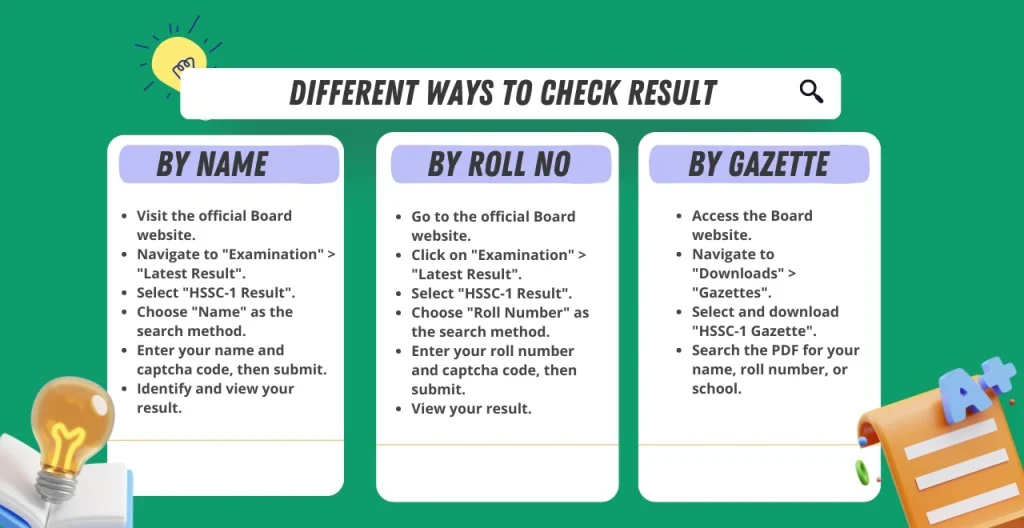
Check BISE Swat Board 11th Class Result BY Roll Number
Here’s how you can check your 11th class result on the official Abbottabad board website:
- Visit the Swat Board website https://www.bisess.edu.pk/.
- Click on “Home.”
- Go to the “Results (SSC / HSSC)” section.
- Select “HSSC / Intermediate Results.”
- Open “RESULTS OF 11th ANNUAL-II EXAMINATION 2025.”
- Choose the “Roll Number” option.
- Enter your roll number in the search bar.
- Click the “Submit.” button.
- Wait for 15 to 20 seconds.
- Click on your result to view the details.
SMS Check Swat Board 11th Class Result
Here’s how to check your result via SMS:
- Create a new message and type “BISESS [Roll Number].”
- Send it to 8333.
- Ensure you have at least 5 PKR in your account balance, as sending the SMS is not free.
- You will receive a reply from the board with the marks you obtained.
Check 11th Class Result Swat Board by Name
- Go to the Swat Board website and click “Home.”
- Navigate to “Results (SSC / HSSC)” and select “HSSC / Intermediate Results.”
- Open “RESULTS OF 11th ANNUAL-II EXAMINATION 2025.”
- Choose “Name” and enter your name in the search bar.
- Click “Enter” and wait for 5 to 10 seconds.
- Find your result by looking for your father’s name and clicking on it for details.
Institution Code Check BISE Swat Board 11th Class Result
- Open the Swat Board website and click “Home.”
- Go to “Results (SSC / HSSC)” and select “HSSC / Intermediate Results.”
- Open “RESULTS OF 11th ANNUAL-II EXAMINATION 2025.”
- Choose “Institute” and enter your institute code.
- Click “Enter” and wait for the results.
- Find your result by name and father’s name, then click to view details.
Check BISE Swat Result by Gazette
- Open the Swat Board website and click “Home.”
- Scroll down to the “Gazettes” section.
- Select “11th ANNUAL-II EXAMINATION 2025Gazette.”
- Download the gazette.
- Search for your name, roll number, or institute code in the gazette to find your result.
Gazette of BISE Swat 11th class 2025
Bise Bahawalpur Board has posted the results gazette on their official website. It takes 1 hour to upload the gazette. Once it’s available, you’ll be notified on our website. Here are the new and Old gazettes you can download at any time.
| Year | Title | Download |
| 2025 | 11th Class | Download/View |
How to Re-Total Exam Copies After an Undesirable Result
Here’s a simplified guide for requesting a rechecking of your exam papers:
Access the Rechecking Form:
Go to the Swat Board website and click “Home.”
Scroll down to “Re-totaling HSSC Annual I” and open it.
Access the rechecking application form.
Fill Out the Form:
Select “HSSC” and “Part-I” as the class and “Annual” as the exam type.
Enter your name, registration number, and 11th exam roll number.
Provide your contact details (mobile number, address, and email).
List the subjects you want rechecked.
Submit the Application
Click “Submit” to send your rechecking application.
Pay the Rechecking Fee
Visit the Swat Board website and go to “Bank Challan & Fee Info.”
Fill in your details and choose “Re-totaling” as the purpose.
Generate the challan form, print it, and pay the fee at the bank or online.
Verification and Rechecking:
After verification, the board will contact you.
Visit the board’s office on the selected day during office hours.
A board member will recheck your exam papers in your presence.
Result Update:
If errors are found, your result will be updated.
If successful, you’ll receive a refund of the rechecking fee.
Note: The rechecking process reviews marking errors only; previously checked questions won’t be re-evaluated. Be patient and hopeful for an accurate result.
Marks Distribution of Bise Swat 1st year
| Subjects names | Total Marks/Subject |
| English (Compulsory) | 100 |
| Urdu (Compulsory) | 100 |
| Islamic Education (Compulsory) | 50 |
| Mathematics/Biology/Computer Science/Commerce | 100 |
| Physics | 100 |
| Chemistry | 100 |
| Total Marks | 550/550 |
How to get Bise Abbottabad migration form
Here’s a simplified guide to obtaining a Migration NOC:
Download the Form:
- Visit the Swat Board website and click “Home.”
- Click on the download section, scroll down to “Download Forms,” and find the “Board/College Migration Form.”
- Download the form.
Fill Out the Form:
- Enter your roll number.
- Select “HSSC” as the class and “Annual” or “Supply” as the exam type.
- In the Next section, write your basic Information, including your father’s name and registration number from your Detailed Marks Certificate (DMC).
- In the School/College section, write down your current college or board you are moving to.
- Write your full address and mobile number in the Contact Section and sign the form.
Pay the Fee:
- Go to “Bank Challan & Fee Info” on the Swat Board website.
- Enter your details and select “Migration” as the purpose.
- Generate, print, and pay the challan at the bank or online.
- Write the paid challan number and date on the form.
Submit the Application:
Send the completed form, original fee receipt, and DMC to the Swat Board.
The board will process your application and send the Migration NOC to your home address.
How to Cancel Your Swat Board 11th Class Result
Here’s a simplified guide to cancel your exam result or specific papers with the BISE Swat Board:
Download the Cancellation Form:
- Go to the Swat Board website.
- Click “Home.”
- Scroll to “Download Forms” and download the “Paper Cancellation Form.”
Fill Out the Form:
- Enter your roll number, name, father’s name, and registration number from your DMC.
- Select “HSSC” and “Annual” or “Supply” as the exam type.
- Mention the subjects to cancel (up to two subjects) or write “Entire 11th Class Result” for complete cancellation.
- Provide your mobile number and sign the form.
Pay the Cancellation Fee:
- Navigate to “Bank Challan & Fee Info” on the website.
- Enter your details and select “Cancellation” as the purpose.
- Generate and print the challan form, then pay the fee at the bank or online.
- Write the challan number and date on the form.
Submit the Application:
- Send the completed form, original fee receipt, and DMC to the BISE Swat Board.
- The board will process your request and notify you about the cancellation.
How to Improve Results by Taking Supplementary Exams
Here’s a simplified guide to apply for supplementary exams with the Swat Board:
Visit the Swat Board Website:
- Open your web browser and go to the Swat Board website.
- Click on the “Home” tab.
- Access the 11th Registration Portal:
Fill Out the Application Form:
- Enter your name and guardian’s name.
- Provide your contact details (phone number and address).
- Write your exam roll number.
- Select “Supplementary” as the exam type.
- Include your previous exam marks and grades.
- Choose the subjects you want to improve.
Submit the Form:
Click “Submit” to complete the registration.
Pay the Fee:
Generate the challan from the website.
Pay the required fee for the supplementary exams.
Receive Your Roll Number Slip:
After successful registration and fee payment, you will receive a roll number slip for the supplementary exams within 3 to 4 weeks.

Frequently Asked Questions
When will the 11th class result be announced?
You can expect the results to be released in the first week of October 2025.
How can I check my 11th class result online?
Visit the Swat Board’s official website.
Select “Results.”
Choose “HSSC intermediate results” and enter your roll number.
Can I check my result by name?
If the website offers this option, you can check your results by entering your and your father’s names.”
What is the SMS code used to check the result?
To check results via SMS, send your roll number to code 8333.
How can I check the result using the gazette?
Download the gazette in PDF format from the Swat Board’s website and search for your results.
When are the position holders announced?
Position holders are announced one day before the regular result announcement.
How do I apply for supplementary exams?
Visit the “11th Registration Portal” on the Swat Board’s website, fill out the application form, and pay the fee.
How can I cancel specific exam papers or all results?
Download the “Paper Cancellation Form” from the Swat Board’s website, fill it out, pay the fee, and submit it with the receipt.
What is the procedure for obtaining a Migration NOC?
Download the “Board/College Migration Form” from the Swat Board’s website, fill it out, pay the fee, and submit it with the receipt.
How do I apply for a paper rechecking?
Fill out the rechecking form on the Swat Board’s website, pay the rechecking fee, and submit the form with the original receipt., including phone number, email, and address, in the table below.
Bise Swat Board Contact Information
| Bise Swat Chairman | Prof: Tasbihullah |
| Bise Abbottabad Contact Number | 0946-865670 0946-865732 0946-865671 |
| Bise Swat Email | [email protected] |
| Exam Date | July 2025 |
| Result Date Date | 18 September 2025 |
| Bise Swat Address | BISE, Swat 7 Km Marghazar Road Saidu Sharif Swat. |
| Bise Abbottabad Official Website | https://www.bisess.edu.pk/site/ |
| Result Availability | Online (roll number, name, gazette) Offline: Via SMS |